|
One Place Product Documentation
HOWTO: Clear the System Event Log in an IVR System
Prior to startup
Step 1.
Login to client IVR server console as Administrator.
Step 2.
Click Start, then Programs, then Administrative
Tools, then Event Viewer.
The event viewer application window will open on the desktop.
Step 3.
Click the Log menu in the Event Viewer application, then click Clear
All Events menu item.
Step 4.
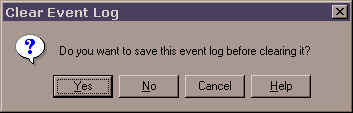
Click No on the following popup:
Step 5.
Close the Event Viewer application.
HOWTO: Setup an IVR System for 30-Day System
Event Log Rollover
(This must be done on all IVR servers during the initial setup)
Step 1.
Login to client IVR server console as Administrator.
Step 2.
Click Start, then Programs, then Administrative
Tools, then Event Viewer.
The event viewer application window will open on the desktop.
Step 3.
Click the Log menu in the Event Viewer application, then click Log
Settings menu item.
Step 4.
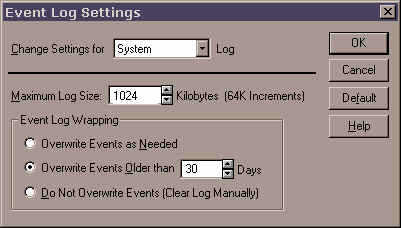
In the Event Log Settings window that appears, apply the following settings:
Step 5.
Close the Event Viewer application.
|